Sketch
Creative Workshop
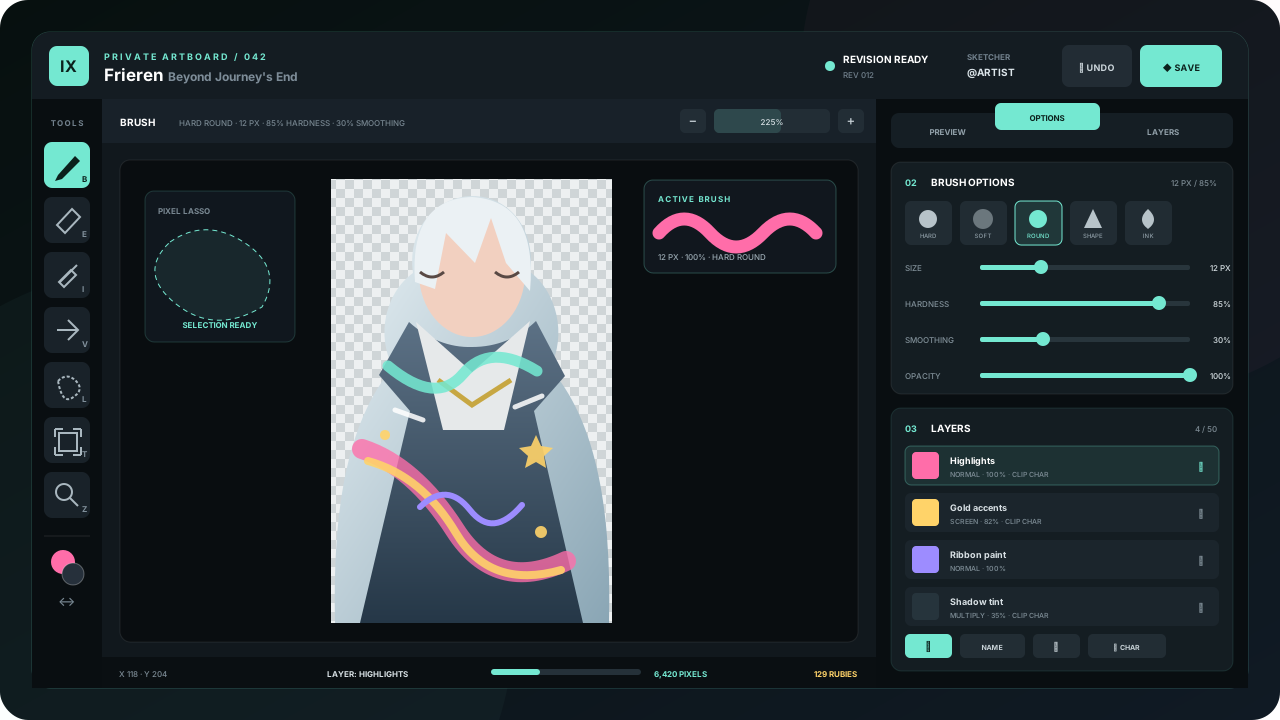
Sketch lets you paint a personal 225 × 350 layer over one of your servants. Work alone or permanently credit a second player as the sketcher, preview the result on the real card, and pay only when the finished artwork is accepted.
Create a private sketch session
- 01
Choose a servant
Run
/sketch, press Create, and select a servant you currently own. Shattered servants are excluded, and each servant can have only one open session. - 02
Assign credit—or keep it solo
The owner always has access. Optionally select one non-bot Discord user as Sketcher; the choice grants editor access and permanent credit for that session.
- 03
Open Session Link
Index sends the editor URL privately. Sign in with Discord; only the owner and assigned sketcher can open it.
Paint with the studio
Brush
Choose hard, soft, transfer, shape, or ink presets; tune size, hardness, smoothing, opacity, and rotation.
Erase & sample
Erase pixels non-destructively on the active layer or sample an exact color from the canvas.
Pixel lasso
Select a region before moving or transforming so the rest of the active layer stays untouched.
Move & transform
Move, scale, rotate, or flip the active layer—or only the selected pixels when a lasso is active.
Compose safely
Use up to 50 named layers, reorder or duplicate them, adjust opacity and blend modes, and preserve editable separation.
Stay inside the art
Clip directly to the character mask or to the transparency of the layer below for color, lighting, and texture passes.
Understand the Ruby meter
The footer counts pixels that differ from the base character. The application price is one Ruby per 50 changed pixels, rounded up, with an 80-Ruby minimum.
max(80, ceil(changed pixels ÷ 50))Transparent or untouched pixels do not inflate the count. Broad full-canvas effects cost more than focused edits, so use clipping and purposeful layers. The current total updates in the studio and again in Discord before submission.
Save, preview, and submit
- Save RevisionStores the complete editable layer project and refreshes pixel totals. Save often; if two people edit at once, reload after a revision conflict.
- Live CharacterShows the transparent character plus the current sketch layers.
- Saved CardUses Index's real card composition so you can check frames, cropping, and readability before committing.
- Submit for ReviewRequires a saved sketch, enough Rubies, continued ownership of the servant, and confirmation of the displayed cost.
Submission freezes editing. If changes are requested, the same project reopens; otherwise the accepted sketch is charged and permanently attached to the servant. Use Servant Customize afterward to show or hide the sketch layer.
BACK TO THE WORKSHOPStart or boost the next Request→