Request Artwork with Framing
Creative Workshop
Every request image is preserved at full quality, then framed non-destructively for Index's 225 × 350 canvas. You choose the source; the studio stores both the untouched original and your exact transform.
Get your private link
Open /request, select a request you created or boosted, and press Image Recommendations. Index replies privately with the website link. Sign in with the same Discord account that supported the request.
01 · Discover a strong source
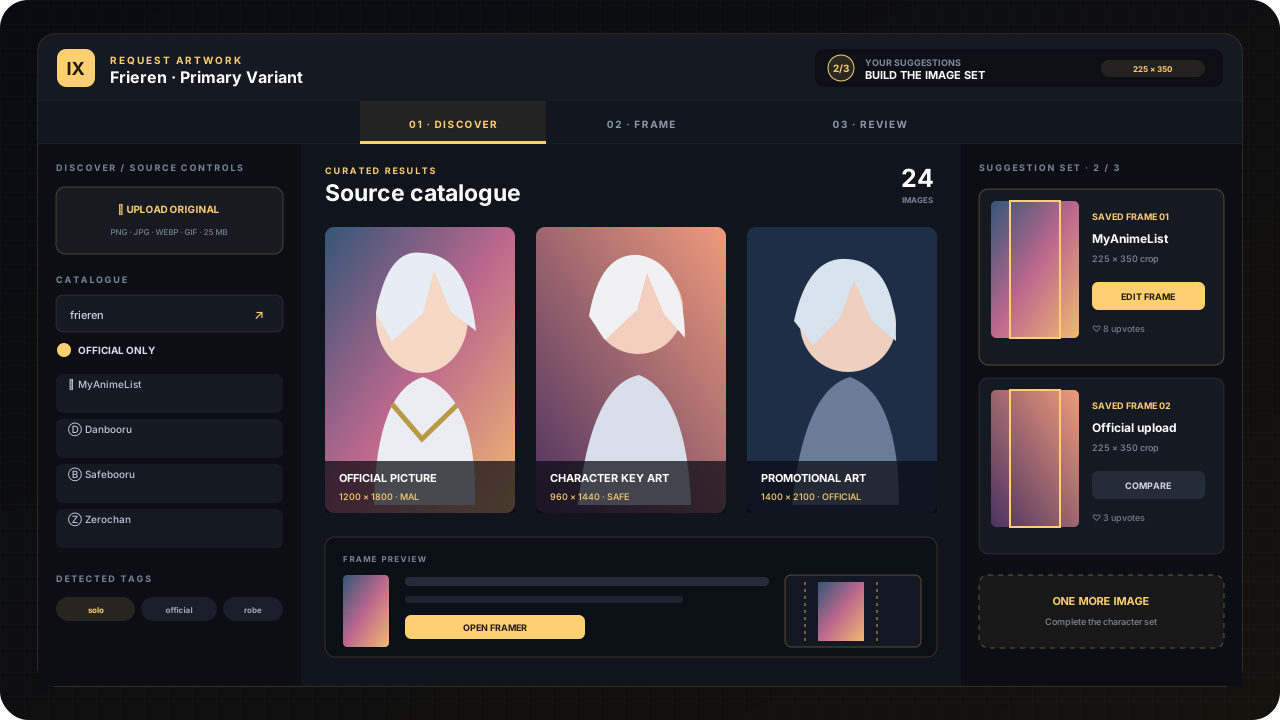
The left rail searches Index's connected catalogues and puts official-art signals first. Search by character name, keep Official Only enabled, and use detected tags to narrow a large result set. Active variants are shown beside the catalogue so you can avoid near-duplicates.
Import a result
Choose a clean, high-resolution image with the complete character visible. Index preserves its source page and original file before opening the framer.
Bring an original
Upload when you already have an official source. Confirm that it is licensed and safe, then let Index validate its format and dimensions.
02 · Frame for Index
The bright rectangle is the final card canvas. Position the character with enough breathing room for frames and UI, keep faces and important details clear, and avoid empty edges. Your framing never overwrites the source.
- T
Transform
Drag to move. Use handles or the controls to scale, stretch, and rotate the selected image.
- V
Move view
Pan around the workspace without changing the saved transform.
- R
Reset
Return to a clean fitted frame when an experiment gets away from you.
- ⇧
Nudge precisely
Arrow keys move one pixel; hold Shift for ten. The mouse wheel zooms around the pointer.
Use Undo/Redo while framing, then press Save Framing. A saved suggestion contains the original image, source information, tags, and the framing transform.
03 · Build the image set
The Review tray contains every saved suggestion. Open a card to compare the frame with its original, refine your own framing, remove a weak submission, or upvote a useful image contributed by another player. You cannot upvote your own work.
- Character requests need varietyContribute three genuinely useful choices—not three crops of the same source.
- Variant and modification requests are focusedOne excellent, accurately framed source is enough to move forward.
- Processing means lockedWhen the request enters production, the page becomes read-only and request boosts close.