Render
Creative Workshop
Render is Index's community cutout studio. Players trace a finalized request image with editable vector paths, preview the transparent result live, and submit a clean character render for an Index reward.
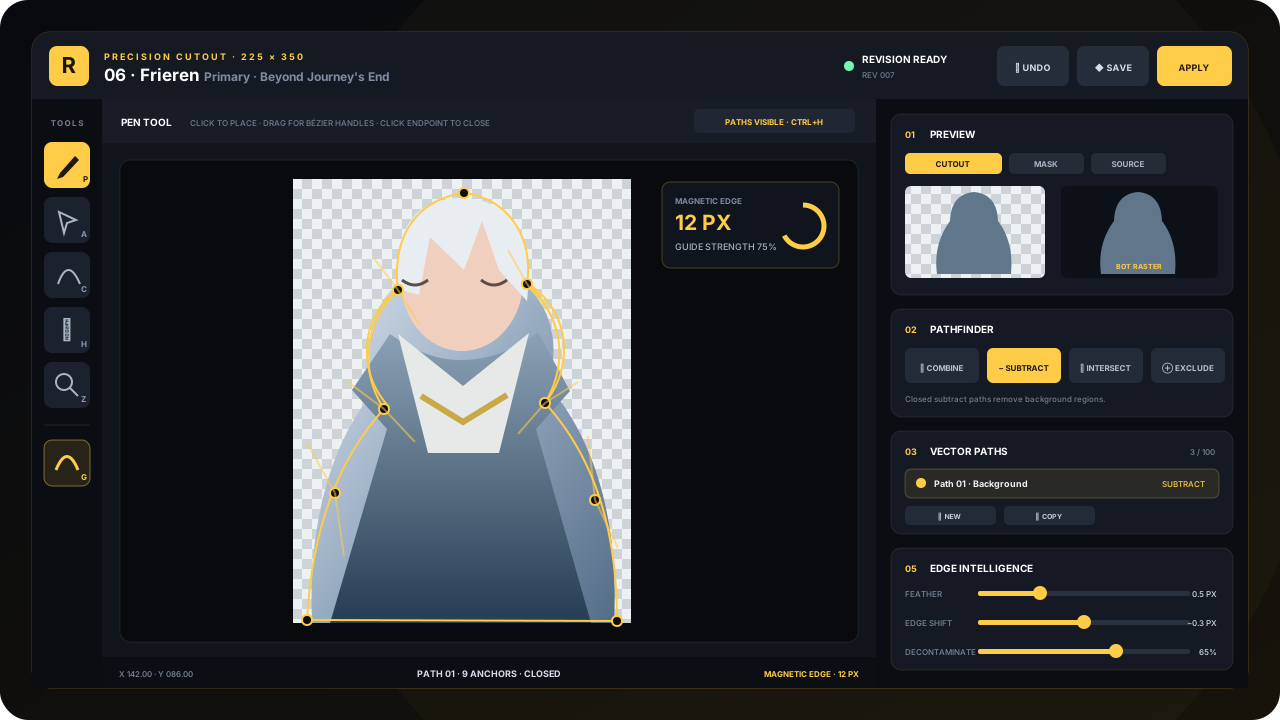
Claim a canvas from the queue
Open /render and select an available image. The queue is ordered by request boosts and tells you how many other renderers are active. Multiple players may try the same image; once a finished version is waiting, that target pauses.
- 01
Select an image
Open the dropdown, pick a character and variant, and inspect the framed preview.
- 02
Start the session
Press New render session. Index sends a private studio link that only your Discord account can open.
- 03
Return safely
Select the same queue image and press Reopen Session any time before its 24-hour expiry.
The core cutout workflow
New paths use Subtract by default: draw closed paths around background areas that should disappear. The live Cutout, Mask, and Source tabs show exactly what the current path operations produce.
Pen
Click for straight anchors. Click-drag for Bézier handles. Click the first anchor again to close the path.
Direct selection
Move anchors and reshape curve handles. Hold Ctrl temporarily while using another tool.
Convert point
Create, reset, or move one handle independently when hair and costume edges need a sharp change of direction.
Edge guide
Toggle magnetic guidance. Hold Shift while placing or moving a point when you intentionally need to bypass it.
Hand
Move around a zoomed canvas. Holding Space gives you the hand temporarily.
Zoom
Inspect delicate edges closely. Alt-click zooms out, and Fit returns the whole card to view.
Build a clean mask
- Use several sensible pathsSeparate outer background, gaps between limbs, loose hair, and small interior holes. Smaller paths are easier to correct.
- Check all three previewsCutout catches halos, Mask catches missed holes, and Source keeps you oriented on difficult edges.
- Use feather and edge shift lightlyFeather softens hard cuts; edge shift moves the mask boundary; decontaminate reduces leftover background color.
- Save revisions oftenCtrl+S stores the vector project and refreshes the Index bot-card preview. The most recent save wins if the same link is open twice.
Submit the render
Save at least one vector path, inspect the enlarged preview, then press Apply Render. Confirming runs Index's final cleanup, sends the result forward, and makes the session read-only. If the image needs another pass, Index can reopen the same private session with the existing vector project intact.
When your render is accepted and published, Index sends you the finished image in DMs and grants a reward from the Render Reward pool. You can preview that reward pool from the Render Chest button in Discord.
ANOTHER CREATIVE TOOLPaint a custom servant Sketch→